Spot an event on TikTok, Instagram, or Facebook. Share it to Happa. We read the post, find the details, and put it straight on your calendar. No typing, ever.
Happa lives in your share sheet. No switching apps, no copy-paste, no typing dates by hand.
Tap the share button on any TikTok, Instagram, or Facebook post. Pick Happa. That is it.
Happa looks at the post and finds the event name, date, time, and location for you. Automatically.
You see what Happa found. Fix anything that looks off, then save it to Google Calendar, Apple Calendar, or Android.
Happa finds the event name, date, time, and location from any post. You do not type a single thing.
Saves to Google Calendar, Apple Calendar, or Android. Pick whichever you already use.
Before anything is saved, you see what Happa found. Change anything that looks wrong.
Turn on instant save and events go straight to your calendar when Happa is sure about the details.
Happa sets a reminder for 1 hour before and 1 day before every event. You will not forget to go.
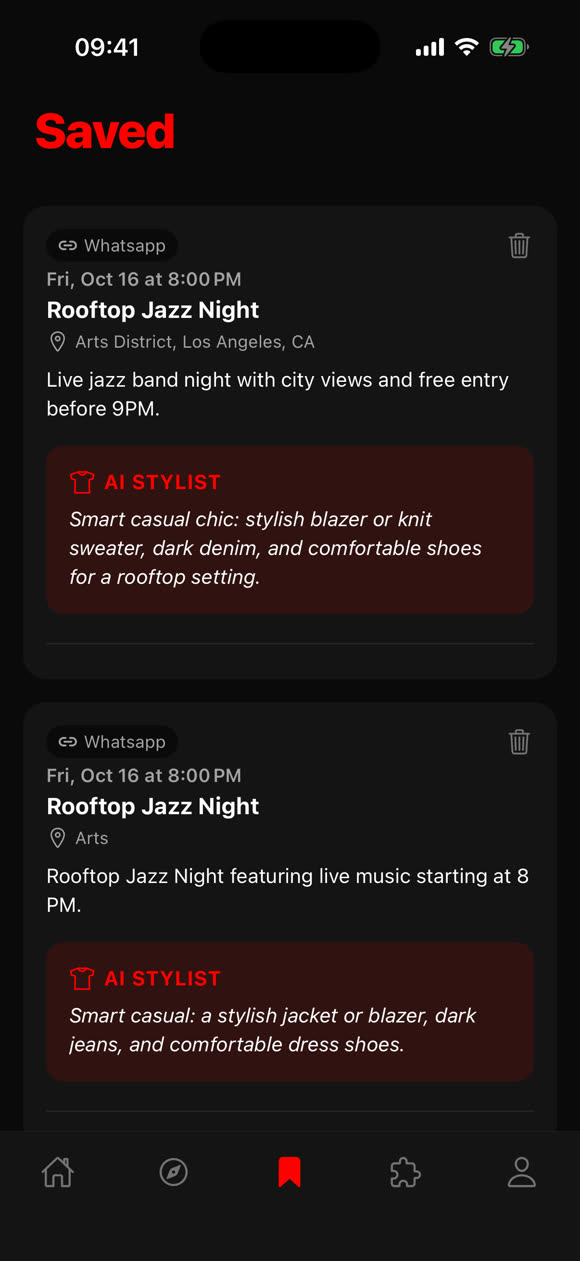
For every event you save, Happa tells you what to wear. No more guessing the vibe.
Every event you save lives in your personal library. Browse them, delete ones you changed your mind about, and get outfit suggestions for each one.
You share one link. Happa does the rest. Here is what happens in the background.
Happa opens the link and reads the caption, the title, and anything else written in the post.
It looks through all the text to find the event name, when it is, and where it is happening.
Happa checks its own work. If something looks uncertain, it flags it so you can double-check before saving.
Your event is ready with the name, date, time, location, and a short description. One tap and it is on your calendar.
Free on iPhone and Android.