Which one sounds like you?

You saw the perfect event. Then you forgot. You want to go out. You don’t know what’s on. You’ve been meaning to host an event.

Share the post to Happa. It finds the date and place, saves it to your calendar, and reminds you, so you actually go. No typing.

Search events near you and around the world. Save one with a tap and Happa reminds you before it starts.

Create it, sell tickets, and scan people in at the door, all from your phone.

QR code to install Happa On a computer?Scan with your phone to install.

Free to download. Works with TikTok, Instagram, Facebook, YouTube and WhatsApp.

Free to download. Worldwide events, with a Near me search when location is on.

Free to download. Private events start right away; public events need a one-time organizer check.
Three steps.
One calendar event.

Happa lives in your share sheet - and if it landed in a WhatsApp chat instead, that works too. No switching apps, no copy-paste, no typing dates by hand.

Step 01

Share or paste it

Share any TikTok, Instagram, Facebook, YouTube, or LinkedIn post to Happa. Got it on WhatsApp instead? Just paste the forwarded text in - no link required.

Step 02

Happa reads it

Happa finds the event name, date, time, and location - from the caption, a flyer photo, or the words in a WhatsApp message. Even a messy forward works.

Step 03

Check it and save

You see exactly what Happa found. Fix anything that looks off, then save it to Google Calendar, Apple Calendar, or Android.

No link? No problem

WhatsApp forwards are just text, not a link - long-press the message, copy it, and paste it straight into Happa. The date and place get pulled out of the words themselves.

Connects to real events

If what you shared matches an event a verified organizer already listed, Happa links you to the real thing - full details, tickets, and the verified badge - instead of creating a duplicate.

Free to start

Your first 5 extractions are free once you verify your phone number in the app. After that it's a small per-extraction fee from your Happa Wallet.

Everything you need.
Nothing you don't.

Reads the post for you

Happa finds the event name, date, time, and location from any post. You do not type a single thing.

Works with your calendar

Saves to Google Calendar, Apple Calendar, or Android. Pick whichever you already use.

You are always in control

Before anything is saved, you see what Happa found. Change anything that looks wrong.

Skip the check

Turn on instant save and events go straight to your calendar when Happa is sure about the details.

Reminders built in

Happa sets a reminder for 1 hour before and 1 day before every event. You will not forget to go.

What to wear

For every event you save, Happa tells you what to wear. No more guessing the vibe.

Scan any flyer

See a poster on a wall or in a chat? Snap a photo, or pick one from your library. Happa reads it just like it reads a video post.

Buy tickets, skip the line

Paid events on Happa come with tickets built in, including multiple price tiers per event. Buy, get your QR code, and check in at the door. No separate app.

Discover events near you

Happa searches the web for real events happening in your city, on top of everything organized on Happa. Save one that needs no sign-up, or tap through to apply. Either way, we remind you before it starts.

More than saving.
It is your event feed.

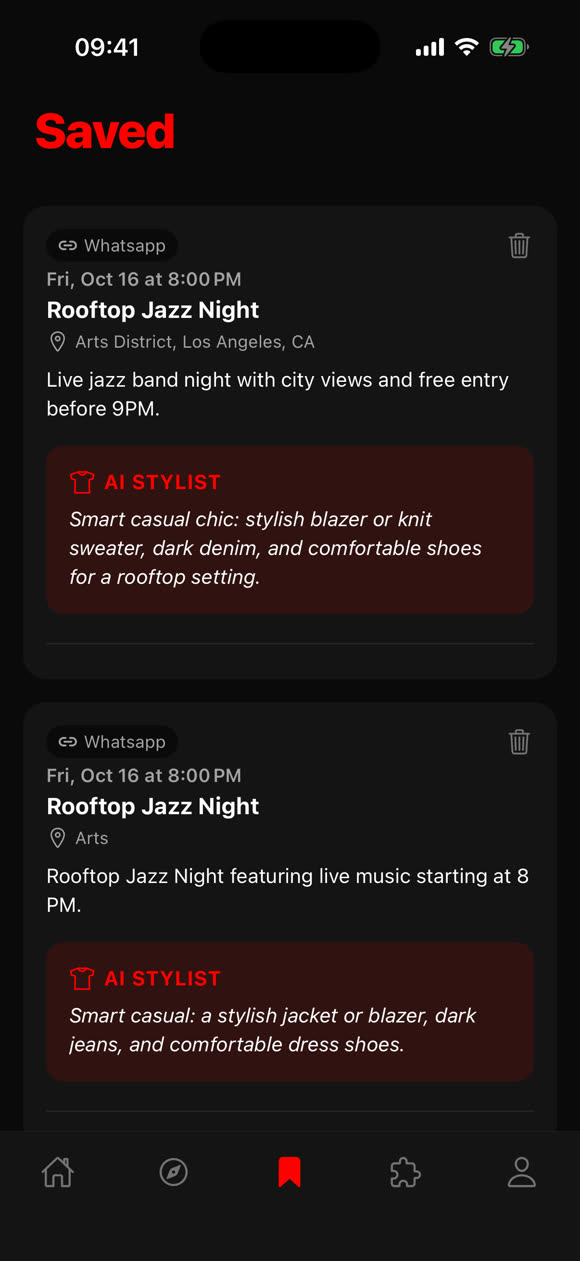
Every event you save lives in your personal library. Browse them, delete ones you changed your mind about, and get outfit suggestions for each one.

All your saved events
Every event in one place, sorted by date. You can always see which post it came from.
What to wear
Happa tells you what to wear to each event. No guessing the dress code.
See what is on your calendar
At a glance, see which events are already saved and which ones still need to be added.
Happa's Saved screen: a saved event with an AI Stylist outfit suggestion

What Happa does
when you share it.

You share a link, paste WhatsApp text, or snap a flyer. Happa does the rest. Here is what happens in the background.

01

Reads what you sent

A link gets opened and its caption read. Pasted WhatsApp text or a flyer photo gets read directly - either way, Happa starts from the words and images themselves.

02

Finds the event details

It looks through all the text to find the event name, when it is, and where it is happening.

03

Checks how sure it is

Happa checks its own work. If something looks uncertain, it flags it so you can double-check before saving.

04

Ready to save

Your event is ready with the name, date, time, location, and a short description. One tap and it is on your calendar.

Event found From WhatsApp
Title
Rooftop Jazz Night
Date
Friday, October 16, 2026
Time
8:00 PM
Location
Arts District, Los Angeles, CA
Description
Live jazz band night with city views and free entry before 9PM.
Source
WhatsApp message
Available on iPhone and Android

Stop forgetting events
you see on social.

Free on the App Store and Google Play.

App Store ▶ Google Play